*Project: Personal Space - Bittle X automatically makes a sound or keeps a distance from people when someone gets too close.
Table of Contents
Thinking About the Task
- What does a distance sensor measure?
- What kind of values do you expect to see?
- How do we make Bittle X play a sound when it detects an object?
- How do we make Bittle X count objects?
Initial Setup
Be sure to make sure Web Coding Blocks are set up:
https://docs.petoi.com/web-block-base-programming/petoi-web-coding-blocks
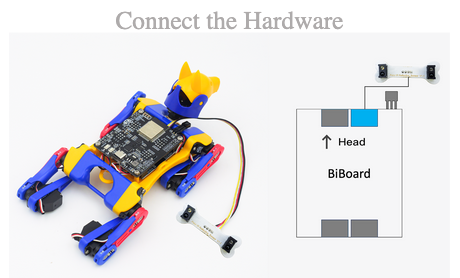
For the hardware, make sure that the IR Distance sensor is connected to Bittle X through the main board. See the figure below.
Let’s Code!
Task 1: Get the value from the distance sensor
First, we focus on reading the value from the sensor. The distance sensor will show us a value caused by an obstacle in front.
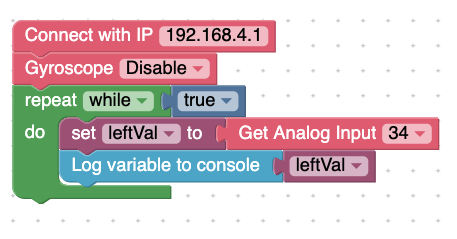
See the values that the distance sensor shows in the terminal.
Code Block: Analog read
Analog: The distance sensor will show you how far away an obstacle is.
Task 2: Make Bittle X sound an alarm for close objects
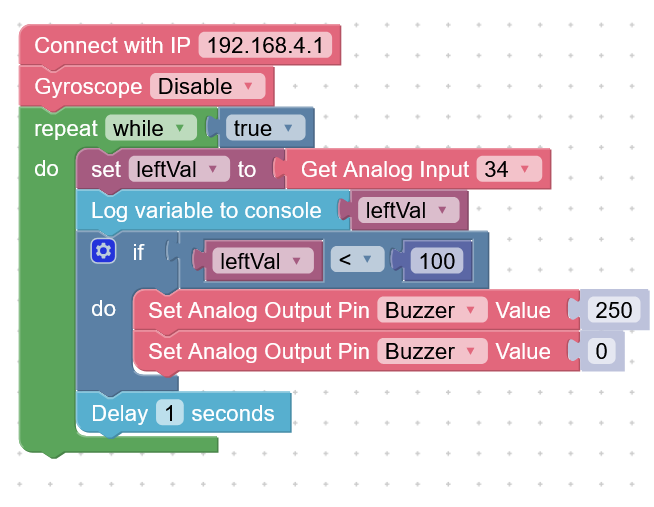
Try this program:
If the return value of the sensor is within 100
Turn on the buzzer
Else
Turn off the buzzer
This is the code. Try this to make Bittle X make a sound if an object is close to the sensor (within a value of 100). See the figure below.
Task 3: Make Bittle X play a melody for close objects
Now, every time the leftVal is less than 100, make Bittle X play a melody. Here is the code:
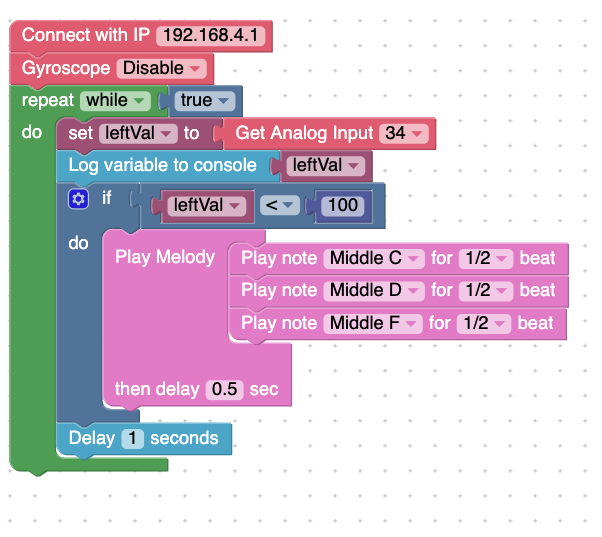
Task 3.5: Make Bittle X back up when it detects an object
To make Bittle X back up whenever it senses an obstacle, you can replace the action in Task 3. Replace the melody with a skill of backing up:
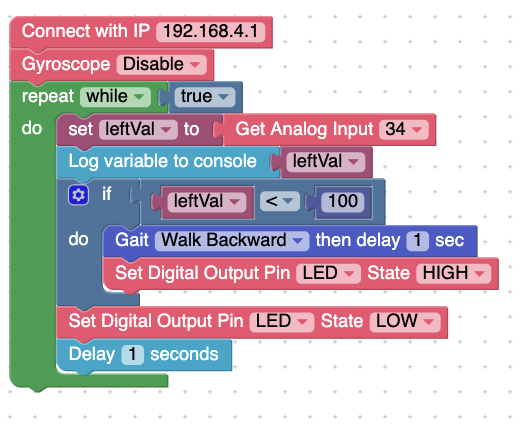
Try the code. With this setup, Bittle X reacts to an object that is sensed.
Task 4: Make Bittle X count the number of objects
How can we use sensors to help Bittle X count a number of obstacles?
The basics of counting:
When we count something, we detect an object and then remember what we just saw. Every time we see another object, we add to our counter in our head.
Similarly, Bittle X can count by using a variable:
Set a variable
Increment the variable by 1 every time an obstacle is detected
Goal:
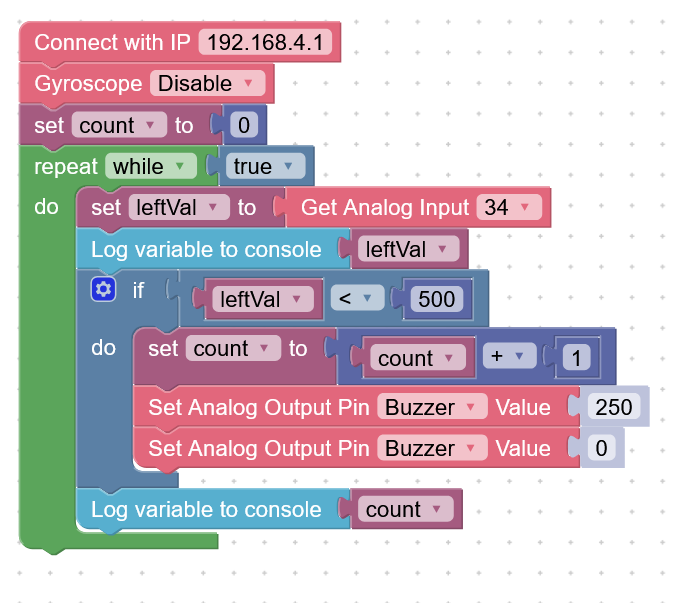
When the return value of the sensor is within 500, print the value to the serial monitor. Increase the count of obstacles and print it to the serial monitor.
Try this code:
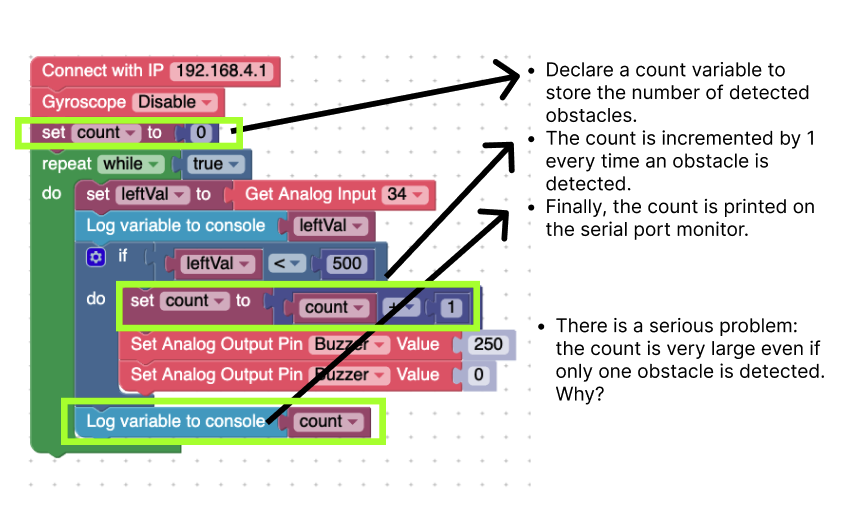
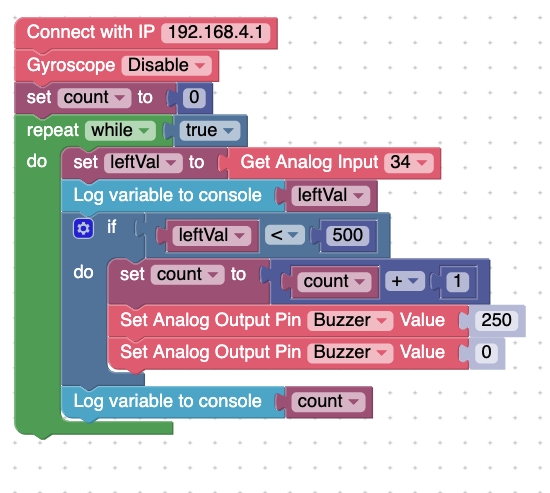
Explanation, but with a problem: This code makes a new variable called count. It shows a count of how many times an obstacle is detected.
The count increases by 1 every time an obstacle is detected. It prints it at the end of the code.
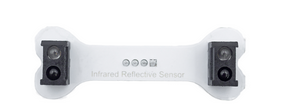
However, the count is very large even if only one obstacle is detected. That is because there is a left and right side for the sensor. See figure below.
To fix this, try the following code. We added more code to detect if there is truly an object by activating both the left and right side of the distance sensor.
When the difference between the two readings is greater than 100, we consider that there is a new object.
This code has a couple of nested if-statements (nested meaning that one is put inside another). It allows the program to check a couple of things:
First, it creates two variables:
leftVal - the distance sensor’s first reading
newVal - the distance sensor’s second reading
This code calculates the difference between the current distance being measured. If the difference is greater than 100, then that means there is a new object.
Now we do the same code as before for the counting.
The result of this code is a more efficient way to count.
Task 5: Turn head
Write code that allows the Bittle X to measure both sides at the same time and turn its head toward the closer end.
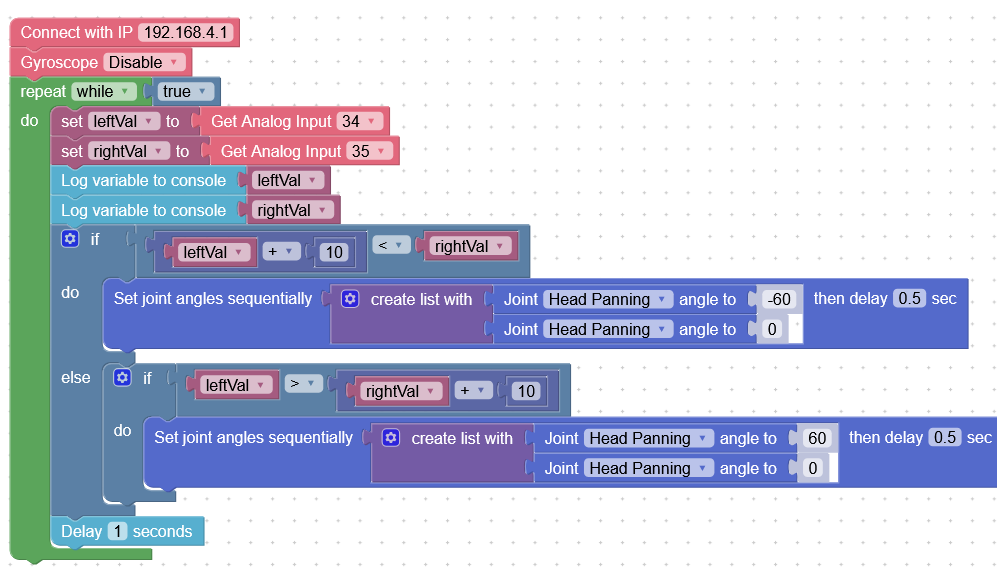
In this code, there is leftVal and rightVal, the left and right sides of the sensor.
In the if-statements, if the left value is significantly bigger than the right, then the head turns (60degrees to 0).
Conversely, if the right value is bigger than the left, then the head turns (-60 degrees to 0).
As a result, Bittle’s head turns toward the object.
Project Takeaways
- A distance sensor can measure the distance to an obstacle.
- To make Bittle X play a sound when it detects an object, we can try Task 1-2 and make the sensor trigger an event.
- To make Bittle X count objects, we can try Task 4.
You-Try
- Make Bittle X sense and object, either using the left or right side of the sensor. Then, make it do an action.