*Project: Obstacle Course - Make Bittle X walk around objects in a simple obstacle course
Table of Contents
Thinking About the Task
Let’s teach Bittle X to navigate an obstacle course by walking around objects.
In this project, we will make a simple path for Bittle X to navigate. We will also make it navigate the course multiple times.
Initial Setup
https://docs.petoi.com/web-block-base-programming/petoi-web-coding-blocks
Let’s Code!
Code Block: Repeat/While with Condition
In previous projects, we did a repeatblock. We will use this to have Bittle X follow a path and repeat it multiple times.
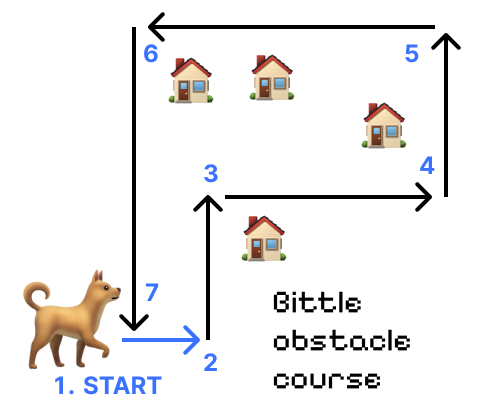
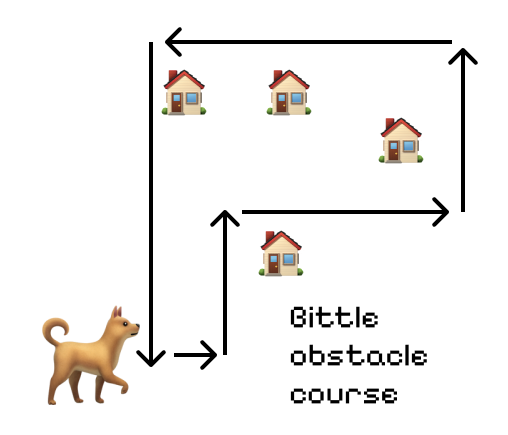
First, think of the pathway that Bittle X will follow. See the figure below.
If Bittle X starts at the bottom, the sequence of events is:
- Bittle X walks Forward
- Turn Left
- Turn Right
- Turn Left
- Turn Left
- Turn Left
- Turn Left
Repeat
Set up the program with these blocks.
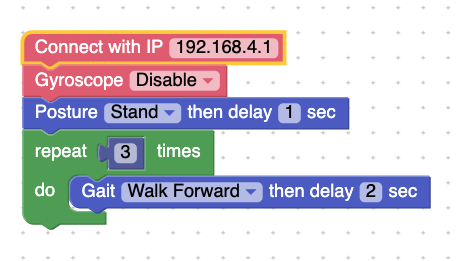
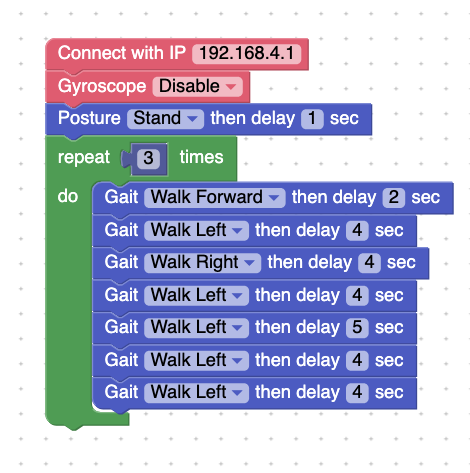
Press Run. Bittle X should move forward for a short distance, and then follow the path that you set for the obstacle course. It will repeat this path 3 times.
Project Takeaways
- The
repeat untilblock allows us to move while a condition is true.
- We can change the length of time that Bittle X will perform a skill. For walking, this determines how far it will walk in a certain direction.
You-Try:
Obstacle Course - Set up your own obstacle course and program Bittle X to navigate it!