*Project: Make Bittle X do Random Skills
Table of Contents
Video Tutorial with Petoi Coding Blocks to Illustrate the Workflow
Thinking About the Task
Let’s teach Bittle X to perform random skills.
Think of a dice. How can we choose a random number?
In this project, we will make Bittle X perform random skills by using a random number generator.
Initial Setup
Be sure to make sure Web Coding Blocks are set up:
https://docs.petoi.com/web-block-base-programming/petoi-web-coding-blocks
Let’s Code!
Code Block: Pick Random Integer
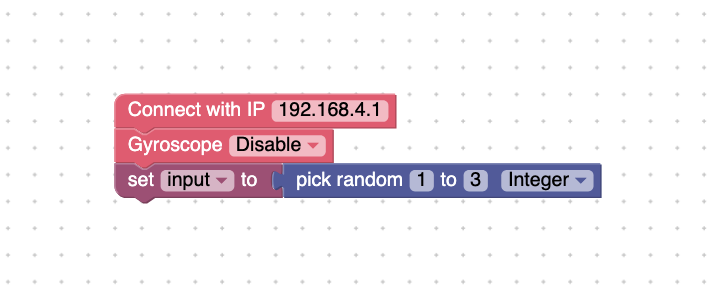
Add the main start block and the auto open serial portblock, and then add the variable > set input to block. Go to Number> pick random integer. See figure below.
Then, add these blocks:
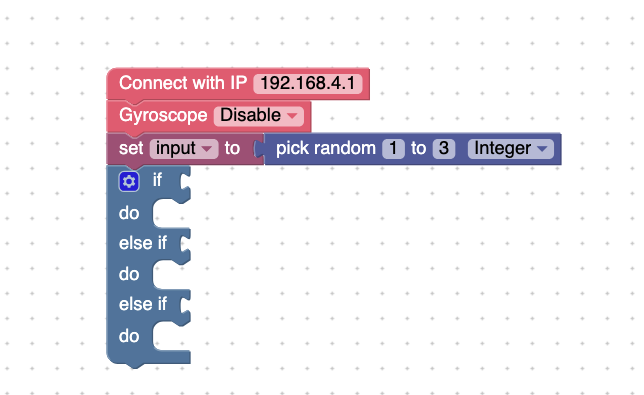
Add these blocks. See below.
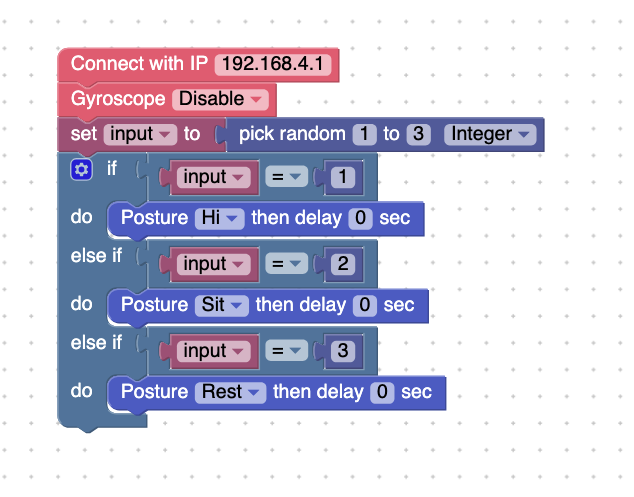
Press Run. You should have Bittle X randomly perform one of the 3 skills. The pick random integer block will choose a random number between 1 to 3 and set it as the input variable. Then the if do block will choose a skill depending on what number was chosen (either 1, 2, or 3).
Bonus
Another block you can use for the input is the get input block. You can type in the input in the keyboard itself. Use this block:
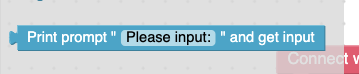
Replace the input = ___ part of your code and use this block. You will now be able to type in a number into the terminal and then make that your input.
Project Takeaways
- The
random integer blockallows us to choose a random number.
- The
ifcan have as many conditions as you like. Each scenario is triggered by a different condition.
You-Try:
Pet Trick - Bittle X is trained to do a unique pet trick. Try making your own unique pet trick, but with a random variable and your own if block.
Tell a partner what trick you have made Bittle X do. Describe the blocks that make it a unique trick, how you tested and debugged (if it was necessary), and then have Bittle X show off the trick.